One network for your devices and services
CGNAT can prevent incoming connections from reaching your home server, even after you configure port forwarding. A noobtunnel agent connects outward to the hosted network, and a public exit forwards visitors to the service you choose. You do not need a public IPv4 address at home to publish through that exit.
Your enrolled devices also get private WireGuard mesh addresses. Connect directly when possible and through a POP relay when necessary, without making your applications public.
Keep device access private
Reach applications on your own enrolled machines using their private mesh addresses. Direct connections depend on your network and NAT conditions; POPs provide a relay path when a direct route is unavailable.
Understand the connection paths
Publish a service
Expose a selected backend through a public exit using HTTP, HTTPS, TCP or UDP. Visitors can reach a published resource without joining your mesh. Add authentication to any application that should not be open to everyone.
Follow the publishing guide
Know where traffic goes
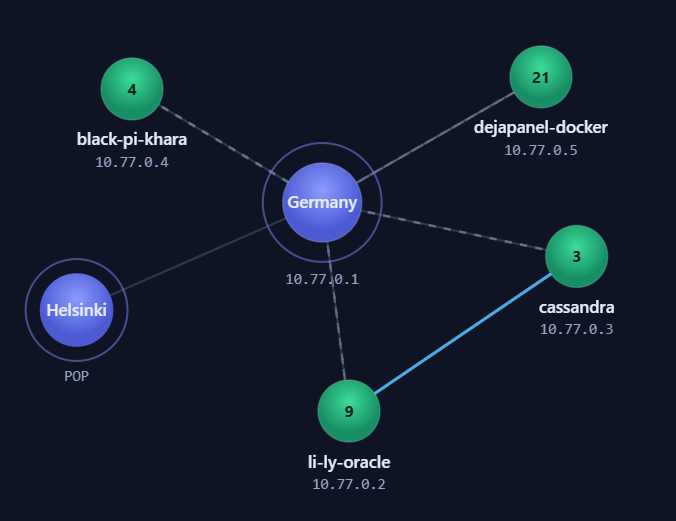
The map shows the network's POPs. Your control panel location, a mesh relay and the exit chosen for a public service are separate parts of the route. Traffic allowances and shared capacity depend on the connection type.
Start with a verified backend
Enroll the device that runs your application, then verify that the application responds from the agent's network context. Choose private mesh access or publish a resource with the correct backend address, protocol and port. Use a verified domain or an available public subdomain for a website. Our service hosting guide takes you from a local test website to a public HTTPS address.
A tunnel does not replace application security. Keep your software updated, protect management endpoints, and publish only the ports you intend to expose. For HTTPS publishing, the POP may terminate the visitor's HTTPS connection before proxying the request through the tunnel.
When a connection fails
Check the local application first, then the agent connection, mesh route, chosen public exit and domain records. An online agent alone does not prove that a backend is reachable. Our troubleshooting guide walks through each stage and explains what to include in a support report.
 Discord Set a password before unlinking Discord.