Minecraft real player IPs with PROXY protocol
When you publish a Minecraft Java server through a TCP tunnel, the server normally sees the tunnel agent's address instead of each player's address. PROXY protocol carries the original player IP to the server, so login logs, IP bans and plugins can use it.
This guide covers a single Spigot or Paper server behind noobtunnel. Players use their normal Minecraft client; they do not install anything. For a Velocity or BungeeCord network, configure PROXY support on the first Minecraft proxy receiving the tunnel connection, then use that proxy's normal forwarding to its backend servers.
1. Choose how your server will read the header
Spigot or older Paper: install the RealIP plugin below. Paper with a native PROXY protocol setting: you can use its built-in support instead. Choose one decoder: do not enable native support and RealIP together.
Set up the receiving server first, then enable PROXY protocol on the noobtunnel resource. Turning on headers before the server can read them usually causes an immediate “Disconnected” error.
PROXY protocol is separate from BungeeCord and Velocity player forwarding. You do not need to change online-mode or enable either forwarding mode for this single-server setup.
2A. Install RealIP on Spigot or Paper
Download SHA-256 checksum · Source on GitHub.
- Stop the Minecraft server.
- Put
real-ip-1.0.0.jarin itspluginsfolder. Install it on the server that receives the noobtunnel connection. - Start the server and check the RealIP startup log. A failed installation intentionally stops the server; resolve its reported error before continuing.
- For noobtunnel and Minecraft running on the same machine, leave the generated configuration alone.
The default plugins/RealIP/config.yml automatically trusts IPv4/IPv6 loopback and the server machine's own detected interface addresses. It works when a same-machine agent targets 127.0.0.1:25565 or that machine's LAN address. It does not trust every device on the LAN.
trust-local-addresses: true
trusted-proxies: []
header-timeout-millis: 5000
max-header-bytes: 4096
Once RealIP is active, this listener expects PROXY headers. Ordinary direct connections, including a Minecraft client connecting straight to localhost, will be rejected. Complete step 3 and join using your public tunnel address.
Agent on another machine, Docker, or a custom proxy chain
If the agent connects from a different machine or isolated container, add the actual source address of its connection to Minecraft to trusted-proxies. The rejection warning shows the address. This is usually the agent's LAN or container address, not a player's IP and not the public POP address.
For example, if the warning identifies an agent at 192.168.50.12:
trust-local-addresses: true
trusted-proxies:
  - "192.168.50.12/32"
header-timeout-millis: 5000
max-header-bytes: 4096
Replace that example with your real connecting peer. Use /128 for one IPv6 address. To trust only your explicit list, set trust-local-addresses: false. Restart Minecraft after changes. Keep the list narrow; 0.0.0.0/0 would let anyone who can reach the backend claim a different IP.
Inside a container, localhost belongs to that container. Configure a target reachable from the agent's network namespace; the Docker networking guide explains this distinction.
2B. Or use Paper's native support
If your Paper build provides this option, stop the server and edit config/paper-global.yml. Change the existing key under proxies:
proxies:
  proxy-protocol: true
Keep the other entries already under proxies; do not create a duplicate section. Some older Paper builds with native support keep this under settings.proxy-protocol in paper.yml. If your build has no such option, use RealIP or update Paper.
Remove RealIP if you choose native support, then restart. Paper documents this option in its global configuration reference.
Restrict access to this backend listener to your tunnel agent, using a loopback bind when they share a host or a firewall rule for a remote agent. A PROXY header is an address claim, not authentication; native support needs the same protected network boundary.
3. Enable PROXY protocol in noobtunnel
- Open Resources and create or edit your Minecraft resource. If you have not enrolled an agent yet, follow the agent setup guide first.
- In Service, choose TCP for Minecraft Java.
- In Targets, choose the online agent and enter the Minecraft backend address and listening port, usually
25565. With a same-machine agent,127.0.0.1works when Minecraft listens there. A separate host or container needs a reachable backend address. - In Publishing, choose your public exit and hostname. Set the application preset to Minecraft Java and enable the Minecraft SRV record if you want players to join without entering the assigned public port.
- Under PROXY protocol, select PROXY v2. RealIP supports both PROXY v1 and v2. We recommend v2 because it takes less work to process the address information when a player connects, especially with IPv6. Both versions show the same real IPs. V2 does not add encryption or a noticeable gameplay speed boost. Older Minecraft versions can use v2 with RealIP too.
- Continue through the remaining steps and click Save resource (or the create button for a new resource).

The public listening port and Minecraft's backend port can differ. Without a working SRV record, use your-public-hostname:assigned-public-port in Minecraft. Do not put the public tunnel hostname in the backend target field.
4. Reconnect and check the real address
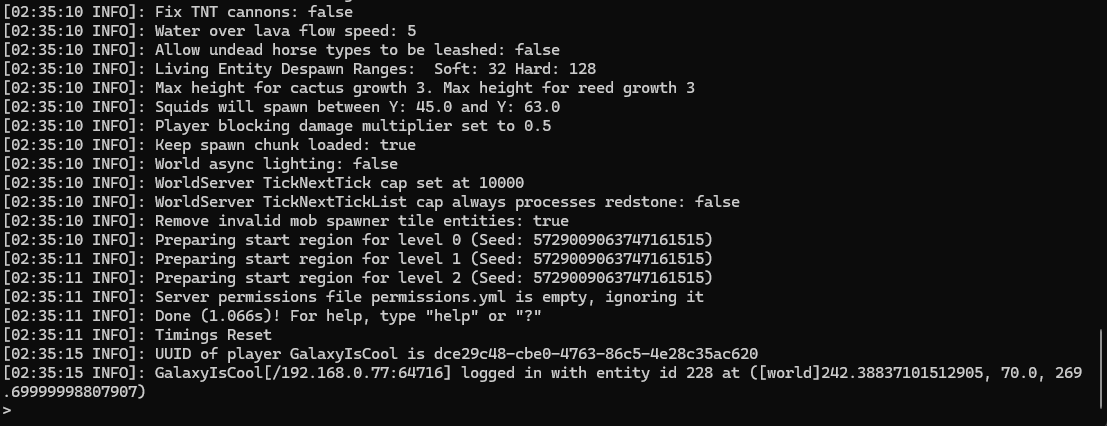
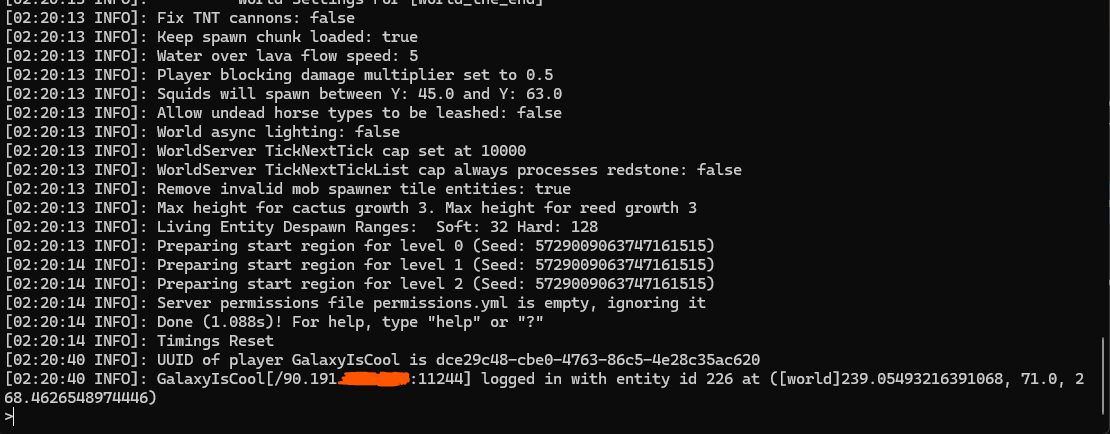
Join through the resource's public hostname with a normal Minecraft Java client. Disconnect any existing session first; the new setting applies to new TCP connections. Compare the login line in your Minecraft console with the player's public IP, not their private Wi-Fi address.
Troubleshooting
Players immediately see “Disconnected”
Check both ends: noobtunnel must send a PROXY header, and the receiving server must have exactly one active decoder. Headers sent to an unconfigured Minecraft server are invalid Minecraft packets. A RealIP-enabled server also rejects connections without headers. Restart after server configuration changes and test the public tunnel address.
“Received proxy connection from untrusted address …”
RealIP rejected the connecting peer before accepting its claimed player IP. On the same machine, ensure trust-local-addresses: true and restart so interface discovery runs again. For a separate agent or container, add the connecting address shown in the warning as described above. Warnings are limited to one per ten seconds.
The server still shows the agent's IP
Confirm the resource was saved with PROXY v1 or v2, restart/reconnect, and make sure you are using the correct public resource. RealIP needs to be installed on the first server receiving the header. If the player's public address and the backend connection use different IP families, noobtunnel currently falls back to an unknown-address header; use a matching IPv4 or IPv6 path to preserve that address.
The target cannot be reached
Verify Minecraft is listening on the configured target address and port from the agent's machine or container. An online agent alone does not prove backend reachability. Follow Agent can't reach the resource before changing public DNS.
Return to ordinary connections
Turn PROXY protocol Off on the resource and save. Remove RealIP or disable Paper's native setting, then restart Minecraft. Both ends must agree again.